
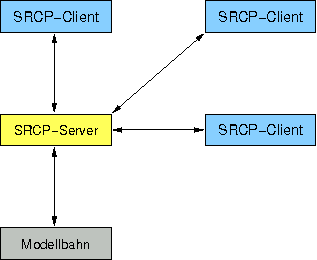
The SRCP protocol was created by the der Moba model railroad group as a standard way of connecting "client" user programs to a "server", which in turn connects to the model railroad. There are a number of model railroad SRCP servers available, which in turn can currently connect to the layout via Intellibox and Märklin 605x control units and the Lenz interfaces. Also available is a server that can directly create DCC signals via an RS232 interface, which DCC booster(s) can then use to power the layout. Other SRCP demons with other connections are being developed all the time.
The initial JMRI support allows JMRI to connection to a layout through a SRCP server. JMRI can then operate Turnouts, Lights and Signal Heads that can be reached via SRCP. There is also initial support for JMRI Throttles via SRCP.
SRCP support was introduced in JMRI v2.1.6 during the Spring of 2008. That first version had several limitations:
To use an SRCP connection, select "SRCP Server" as a protocol under the Preferences.
Next fill in the Internet address for the SRCP server. This can be numbers like
127.0.0.1 or a name like "srcp.sf.net". A server running on the same computer
can usually be referred to as "localhost".
Then fill in the port number. This can be obtained from the configuration for your SRCP server.
Finally, save the Preferences and restart JMRI.
There's a lot of good information on SRCP and how it fits into an overall model-railroad system on der-moba.de (in German). There's an English overview and document for version 0.8.4 of the protocol. The overview page has links to some sample implementations.