
| Version: |
Applications with Online Manual: |
|
| JMRI® current | DecoderPro v4.x/5.x | |
| PanelPro™ v4.x/v5.x | ||
| OperationsPro™ v4.x/v5.x | ||
| DispatcherPro™ v4.x/v5.x | ||
|
General Set Up v4.x/v5.x |
||
| JMRI® v3.10 | DecoderPro3 v3.6 | |
| DecoderPro® v3.6 | ||
| OperationsPro™ v3.6-3.10 | ||
| JMRI® v2.14 | ||
| JMRI® v2.14.1 | ||
| DecoderPro 3 v2.14 | Printable PDF (6.7MB) |
JMRI is a Java-based cross-platform program suite for model
railroaders.
It contains modular applications for:
All this capability is contained in one install.
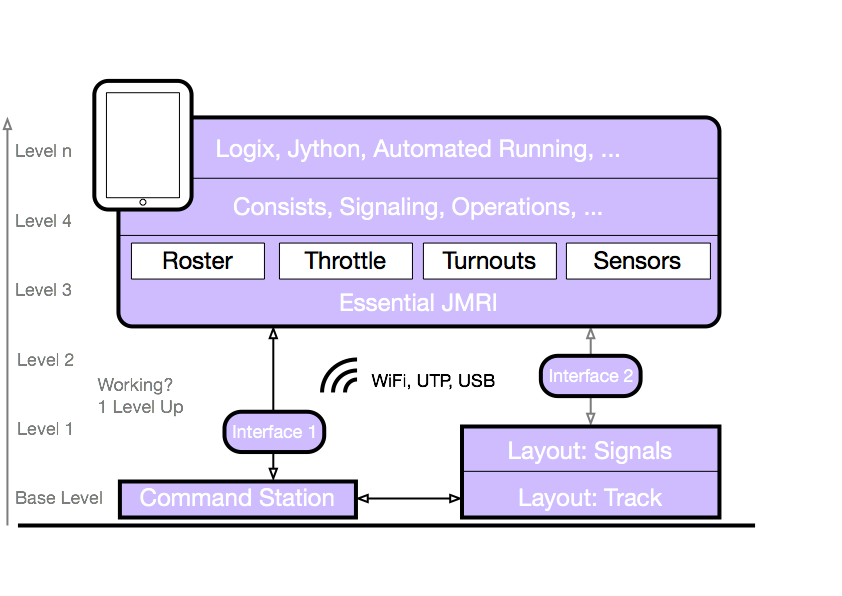
Our general advice is to start with the basics. For that we suggest you start setting up a
simple track connected to your Command Station first.
When train(s) run and a turnout responds to your hand held throttle, it's time to open the
Hardware Help (use the Hardware tab at the top of
the page).
Next is trying to do basic things with PanelPro, for example using a JMRI Throttle to run a
loco.
Once that is operating like you expect, comes the time to build a Panel, fill your Roster,
etc.
Make some notes for yourself, sketch a simple diagram to way you conceive you set up. Often
that helps better than words to get things sorted (and remember 2 years later why you chose
to type that funny turnout name).
You're not discouraged to dive in, but by taking on JMRI - or any powerful, but complex
thing - one step at a time you sort of build a solid foundation that will pay for itself in
due time.
Gradually build on you foundation concepts of the program and pick up elements of interest by
following some of the links at the bottom of the left sidebar on the JMRI web Help.
If this is your first visit to our manual, we suggest that you take the
DecoderPro® tour
to get an overview of what we're about to cover.
JMRI® requires that Java be installed, whether your computer is macOS, Windows, or Linux based.
Version 2.12 can run on any computer system that will run Java 1.5 or later.
Version 2.14.1 requires Java 1.5 (or 1.6 if you wish for drag & drop)
Version 3.10.1 requires Java 1.7 or later.
Version 4.2 - 4.27 requires Java 1.8.
Version 4.99 and up requires Java 11.
More on our Java installer page.