Hardware Support: XpressNet
XpressNet is a Command Bus developed by Lenz and used by: Atlas, Hornby, Lenz, OpenDCC
(DIY), Paco Canada (DIY),
Roco (some models), Viessmann and ZTC Controls.
https://dccwiki.com/XpressNet_Protocol https://uk.hornby.com
The XpressNet specification ( available from https://wiki.rocrail.net/lib/exe/fetch.php?media=xpressnet:xpressnet-v2.pdf
) specifies the electrical communications standards and command set for devices
to communicate with the command station.
Supported Hardware
Command Station
The XpressNet protocol allows the DCC manufacturers that use it to select what
functionality they wish to provide in their command stations. This functionality ranges from
"supports all features" to "bare bones minimal". Unfortunately, this restricts the features
you can access via JMRI - if the hardware doesn't support it, it isn't there to be used by
JMRI.
In general, the features that JMRI cares about can be grouped into three areas:
- Operating Locomotives and Turnouts on the layout
- Programming decoders on a programming track or in ops mode
- Getting Feedback from the layout (the state of turnouts, ops-mode
feedback, etc.)
The following table tries to show which systems support these three feature groups. System
specific limitations are also expressed in the
Limitations section
of each system below.
- Full
-
Operating Programming Feedback
- Lenz LZ100 based systems (software version 3.x)
- Lenz LZV100 based systems (software version 3.x)
- Lenz LZV200 based systems (software version 3.x)
- OpenDCC's Command Center
- Paco Canada's NanoX-S88
- Partial
-
Operating Programming Feedback
- Roco LocoMaus 2 (Roco Part number 10760)
- Roco MultiMouse (Roco Part number 10810)
- Hornby Elite
- Paco Canada's NanoX
- Minimal
-
Operating Programming Feedback
- Atlas Commander
- Lenz Compact
- Lenz LH200
- ZTC Controls ZTC511 (with Command Station Software version 4.0)
Operating Programming Feedback
Operating Programming Feedback
- Paco Canada's GenLI-S88 (adds Feedback to existing XpressNet System)
- Paco Canada's RS2PC (adds RS-Bus based Feedback without XpressNet)
- Unknown
-
The following systems are untested, but should be at least partially
supported:
- ZTC Controls ZTC521 (with XpressNet (aka X-Bus V3.0) software)
- Hornby Select
- Viessmann Commander
- Roco 10830 multiZENTRAl-PRO
Computer Interfaces
Currently the following XpressNet computer interfaces are supported by JMRI:
- The Lenz LI100 is Lenz's original computer interface. It is limited to a serial port
speed of 9,600 baud.
- The Lenz LI100F is an improved version of the LI100. It supports serial port speeds of
9,600 and 19,200 baud. The Factory default is 9,600 baud.
- The Lenz LI101F is Lenz's last serial port based computer interface. It is
significantly different than the LI100 and LI100F in physical appearance, and in the method
by which the device is configured. The device is configured via a software tool provided by
Lenz which runs on Windows only. We have included a configuration tool with JMRI that will
allow users of other operating systems to configure their LI101F as well. The LI101F
supports serial port speeds of 19,200, 38,400, 57,600, and 115,200 baud. The factory
default is 19,200 baud.
- The Lenz LI-USB (Lenz part number 23150 ) is Lenz's first USB based computer interface.
Internally, the device contains a USB to RS232 serial adapter, and an XpressNet interface
circuit similar to that of the LI101F. Note: If you are using the XpressNet version 3.6
update in your command station, you should also update your LI-USB to version 3.6. There
were instructions
https://groups.yahoo.com/neo/groups/DigitalPlusbyLenz/conversations/topics/13501 in this
user group message or on
http://www.lenzusa.com/manuals/xpressnet/liusbupdatev36.pdf the Lenz website. The
device is configured via a software tool provided by Lenz which runs on Windows only. JMRI
provides a tool that will allow users of other operating systems to configure their LI-USB
as well. On Windows, starting with version 2.7.2, JMRI supports interfacing with the LI-USB
through the Lenz LI-USB Server.
- The Lenz LI-USB-Ethernet (Lenz part number 23151) is a revised version of the LI-USB
which includes a built-in Ethernet adapter. The USB connection on the device is provided by
a Microchip chipset and registers itself as a USB CDC-ACM (Abstract Control Model) device.
For Windows users, connection via the USB port will be identical to the previous version of
the LI-USB. For Linux users, the device will appear as a /dev/ttyACMx device (where x is
replaced with a number). For MacOS users, the device name will be /dev/tty.usbmodemXXX
(where XXX is replaced with a 3 digit number)
The protocol used to connect to the device via USB is identical to the prior LI-USB device,
so the USB connection is supported by any JMRI version with support for the LI-USB. When
configuring to communicate with the device via USB, be sure that Flow Control is
turned off.
Connection via an Ethernet connection is available through the LI-USB Ethernet connection
type, which was first made available in JMRI version 2.13.7.
- The Lenz LZV200 is Lenz's command station with a built in computer interface. The
computer interface is very similar to the LI-USB and can ve configured using the JMRI tool
for configuring the LI-USB. The LZV200 connection option was added in version 4.15.7,
though thr LZV200 can also be configured using the LI-USB or LI-USB Server options.
- In addition to the Lenz purpose built computer interfaces, we have also included
support for using an XpressNet Phone Adapter (XPA) as an interface to the an XpressNet
based DCC system. This interface is relatively slow, and it only allows controlling mobile
and stationary decoders, but it may be perfect for someone who is interested in trying out
the control functions of a computer before deciding to go with a full fledged interface.
Note that an XPA cannot be used to program decoders.
- The ZTC Controls ZTC640 is ZTC's USB interface. We have had limited experience with
this device, though the current JMRI drivers are believed to be stable. Operationally, the
device appears to be similar to the Lenz LI-USB.
- The Hornby Elite's built-in USB interface can also be used. Hornby has provided limited
information about how the device works, and currently only provides a USB driver for
Windows, so we are unsure of it's usability with other operating systems. As with the
ZTC640, we have had limited experience with this device, though the current JMRI drivers
are believed to be stable. Note: The first JMRI release supporting the Hornby Elite
USB connection is version 2.1.2
- The XnTcp interface allows you to connect
to your XpressNet layout via Ethernet-based networking from the JMRI programs.
Note: The first JMRI release supporting the XnTcp adapter is version 2.1.5
- Paco Canada's GenLi
is a do-it-yourself XpressNet interfaces that emulate an LI100. There is also a USB version
of this device. To configure these devices in JMRI, please see the instructions for
configuring the Lenz LI100.
- Paco Canada's Gen-LI-S88 has the same
functionality as a GenLI, plus adds an S88 feedback module. It can be used to add feedback
to an existing XpressNet equipped layout. To configure this devices in JMRI, please see the
instructions for configuring the Lenz LI100.
- Paco Canada's RS2PC
Interface allows adding Lenz (and compatible) RS Feedback Bus modules to a system that does
not support the RS Feedback Bus. To configure this devices in JMRI, please see the
instructions for configuring the Lenz LI100.
- Like Paco Canada's GenLi project, there is an interface called S88XpressNetLi,
which is designed and built by Karst Drenth and Wim Ros, and consists of a small print (available
as kit or built module) with 2 XpressNet connectors, a serial interface (9,600baud at the
moment), and a S88 connection (both traditional and S88-N connectors).
- The OpenDCC project has two interfaces for use with JMRI. The OpenDCC Command Station and the
OpenDCC Gateway. These
devices should be configured as LI100F devices with the port speed set to 19,200bps. The
OpenDCC Command Station provides feedback via an S88 connection.
Limitations
- JMRI
-
JMRI supports the current version (XBus/XpressNet Version 3.0). We may add XBus
Version 1.0 and 2.0 support in the future, which will allow all XBus based systems to
work with JMRI.
- Atlas
-
The Atlas Commander provides support only for operation of equipment on a layout
(running trains and throwing switches) from JMRI. You cannot program decoders from a
computer with the Commander.
If you have an Atlas Commander, and would like to use it to control your layout from
the computer, an XPA and Hayes Compatible Modem may be a more cost effective solution
than the LI100, LI100F, LI101F or LI-USB
- Hornby
-
We provide support for the Hornby Elite using it's built in USB connection. The
Elite can be used for operating equipment on a layout (running trains and throwing
switches) and for programming from JMRI.
It is unknown at this point in time if we can control either an Elite or a Select
using one of the other interfaces. Hornby's manuals warn against using their equipment
with that of other manufacturers, so we expect some incompatibilities in this area.
- Lenz
-
We have a pretty good handle on what instructions each Lenz Command station should
support. If you find that you cannot perform a function you think you should be able to
using a Lenz system and the LI100, LI101F or LI-USB, please let us know.
LZ100, LZV100, and LZV200 based systems support the full range of JMRI
functionality. The LZ100 is the command station used in the Set-01. The LZV100 is the
command station used in the Set-90, Set-100, and Set-LI.
The LH200 provides support only for operating equipment on a layout (running trains
and throwing switches) from JMRI. The LH200 is the command station used in the Set-02.
You can't program decoders from a computer with Set-02.
The Compact is the same device as the Atlas Commander, and has the same restrictions
as the commander. The Compact is not available in North America.
If you have either an LH200 or a Compact, and wish to add computer control to your
layout, an XPA and Hayes Compatible Modem may be a more cost effective solution than
the LI100, LI100F, LI101F, or LI-USB.
The BlackBox is a standalone decoder programmer. It can be connected through an
XpressNet interface (such as the LI101F, etc) with a suitable cable. There are some
instructions for creating that cable in the LZV100 manual. The BlackBox only does
programming, and cannot operate either locomotives or accessory decoders (turnouts) on
the layout.
- Roco
-
Note: Roco calls their XpressNet implementation "RocoNet".
The Roco LocoMaus 2 (Roco Part number 10760) has been shown to support operating
equipment on a layout (running trains and throwing switches) as well as programming
locomotives on the programming track.
For programming in service mode, the LocoMaus 2 appears to only be able to write to
CV's.
It is not known at this point in time if the LocoMaus 2 supports Operations Mode
Programming.
The LocoMaus 2 does not support feedback.
The Roco MultiMaus (Roco Part number 10810) has been shown to support operating
equipment on a layout (running trains and throwing switches) and programming
locomotives in both service and operations mode.
The Roco multiZENTRAL-PRO (Roco Part number 10830) is the new command station for
use with Roco's MultiMaus-PRO wireless throttles. The unit features a built in USB
port, but it is unknown at this time how we can utilize it.
The multiZENTRAL-PRO also provides ports for connecting a RocoNet device (MultiMaus,
LocoMaus 2, etc). These ports can be used to connect one of the supported XpressNet
computer interfaces, but it is unknown at this point what, if any, limitations exist
when using this connection.
The Roco Z21 Command Station is covered here.
- OpenDCC
-
The OpenDCC
Command Station should be supported by JMRI through either the RS232 port or the
built in USB port.
This device should be configured as an LI100F device with the port speed set to
19,200 bps.
- Paco Canada
-
Paco Canada has two versions of his do-it-yourself Nanox DCC system available, both
are compatible with JMRI.
The original NanoX DCC system supports operating equipment on a layout (running
trains and throwing switches) and programming locomotives.
The NanoX-S88 adds feedback capabilities to the NanoX system. This feedback comes
through the use of S88 compatible feedback modules.
Paco Canada also provides two methods for adding feedback to non-feedback equipped
systems.
The Gen-LI-S88is an XpressNet interface that includes an S88 feedback module, so it
can be used to add feedback to an existing XpressNet equipped layout.
The RS2PC interface allows adding Lenz (and compatible) RS Feedback Bus modules to a
system that does not support the RS Feedback Bus. This device does not require an
XpressNet connection.
- Viessmann
-
The Viessmann Commander's Low Speed Bus port supports the XpressNet protocol. We
should be able to use this to connect using one of the supported XpressNet computer
interfaces, but the limitations of this port have not been determined.
Viessmann has indicated the Commander's built in USB port can only be used for
updating the firmware and sending data to the commander, not for operating the
device.
- ZTC
-
The ZTC Controls ZTC511 (with Command Station software version 4.0) has been shown
to support operating equipment on a layout (running trains and throwing switches). The
ZTC511 does not support any programming operations from XpressNet devices.
The onboard serial interface of the ZTC511 is not supported at this point in
time.
The ZTC521 (with XBus V3.0 software) has yet to be tested, so the full extent of
what is supported is not known at this time.
You can use any of the Lenz or ZTC interfaces listed above to connect to a ZTC
system that supports the XpressNet (aka X-Bus V3.0) protocol.
If you have either ZTC system and wish to add computer control to your layout, an
XPA and Hayes Compatible Modem may be a more cost effective solution than one of the
purpose built interfaces.
- XPA and Hayes Compatible Modem
-
If you choose to use an XPA and a Hayes Compatible Modem to control your XpressNet
based system, you will be limited to control of locomotives and accessory decoders. You
cannot program decoders from a computer using the XPA, regardless of which system you
have.
Connecting
Wiring
While the Command Stations mentioned on this page support the same commands over the
XpressNet connection, they do not all use the same hardware connectors. It may be necessary
to build an adapter to plug an XpressNet accessory into a Command Station from another
manufacturer.
Connecting using a Lenz LI100, LI101F, or LI101F
- Connect your Lenz LI100, LI100F or LI101F to your DCC Command station via their
XpressNet connections. Then connect the LI100/LI100F/LI101F to the computer's serial port
using a 9-pin serial cable.
- Then go to the preferences panel of a JMRI-based program. This opens automatically the
first time a program is run, or you can select it from the "Edit" menu.
- Select your Lenz interface (LI100, LI100F or LI101F) from the top selection box. You
can then select the proper serial port in the second selection box.
- The Baud rate selection box should be set to match your LI100, or LI100F, or LI101F.
From the factory, the LI100 and LI100F are set to 9,600 baud. The LI101F is set to 19,200
baud.
- The box "Lxx Connection Uses" should be left on "hardware flow control (recommended)"
unless you later consistently get a message about the LI100 control leads being improperly
set up, in which case you might want to try to bypass that by selecting "no flow
control".
- Output Interval : 250 ms
- Click "Save". You'll be asked if it's OK for the program to quit, click "Yes".
- Restart the program. You should be up and running.
Connecting using a Lenz LI-USB
- To connect your computer to one of these XpressNet based DCC systems, you can use a
Lenz LI-USB interface unit. Connect the LI-USB to your DCC command station via their
XpressNet connections. Then connect the LI-USB to your computer's USB port using the
supplied cable.
- Install the appropriate drivers.
- For the LI-USB (Lenz part Number 23150) with JMRI, you must first install a
software driver on your computer. Internally, the device contains a FTDI FT232BM USB to
Serial converter. There are two drivers available for this device, make sure you obtain
the Virtual Comm Port (VCP) driver.
The device drivers for Windows are included on the CD that comes with the device.
The device drivers for Linux are included with recent versions of the Linux
kernel.
Device drivers for Linux, and MacOS (8,9 and X ) and Windows are available from the
FTDI website (direct link to the drivers
current as of this writing: https://ftdichip.com/drivers/vcp-drivers/).
- For the LI-USB-Ethernet (Lenz part Number 23151) in USB mode with JMRI, you must
first install a software driver on your computer. Internally, the device contains a The
USB connection on the device is provided by a Microchip chipset that registers itself
as a USB CDC-ACM (Abstract Control Model) device. Functionally, the device acts like a
serial port. The Lenz documentation indicates the drivers for Windows 7 and MacOS are
installed automatically if the computer is connected to the internet. For Linux, the
drivers are part of the standard kernel distribution.
When the device drivers are installed, and the LI-USB is connected to both your PC and
your DCC system, the LI-USB should have a Red LED turned on, indicating the XpressNet
connection is OK, and a green LED turned on, indicating the USB connection is OK.
NOTE: If you have installed the Lenz software, make sure none of it is
running. This includes the LI-Server, which may be running in the background.
- Once the drivers are installed, you are ready to configure JMRI. Start one of the
JMRI-based programs, Then go to the preferences panel. This opens automatically the first
time a program is run, or you can select it from the "Edit" menu.
- Select "Lenz LI-USB" from the top selection box. You can then select the proper serial
port in the second selection box.
- The baud rate selection box should be set to 57,600 baud.
- The fourth box should be
- (for the Lenz LI-USB, Lenz Part 23150) left on "hardware flow
control" unless you later consistently get a message about the LI-USB control leads
being improperly set up, in which case you might want to try to bypass that by
selecting "no flow control".
- (for the Lenz LI-USB-Ethernet, Lenz Part 23151) set to "no flow
control" (the LI-USB-Ethernet does not support flow control).
- Output Interval : 250 ms
- Click "Save". You'll be asked if it's OK for the program to quit, click "Yes".
- Restart the program. You should be up and running.
Connecting using a Lenz LI-USB and the Lenz LI-USB Server
(Windows Only)
Note: The first JMRI release supporting the Lenz LI-USB Server connection is
2.7.2
- To connect your computer to one of these XpressNet based DCC systems, you can use a
Lenz LI-USB interface unit and the Lenz LI-USB Server software. Connect the LI-USB to your
DCC command station via their XpressNet connections. Then connect the LI-USB to your
computer's USB port using the supplied cable.
- In order to use the LI-USB server with JMRI, you must first install the Lenz drivers
and software. These are provided on the CD that comes with the LI-USB.
When the device drivers are installed, and the LI-USB is connected to both your PC and
your DCC system, the LI-USB should have a Red LED turned on, indicating the XpressNet
connection is OK, and a green LED turned on, indicating the USB connection is OK.
NOTE: to use the LI-USB server, you MUST install the Lenz software and the
LI-Server must be running.
- Once the drivers are installed, you are ready to configure JMRI. Start one of the
JMRI-based programs, Then go to the preferences panel. This opens automatically the first
time a program is run, or you can select it from the "Edit" menu.
- Select "Lenz LI-USB Server" from the top selection box. There are no additional
configuration steps required to use the LI-Server.
- Output Interval : 250 ms
- Click "Save". You'll be asked if it's OK for the program to quit, click "Yes".
- Restart the program. You should be up and running.
Connecting using a Lenz LI-USB Ethernet (Lenz Part Number
23151) via the Ethernet connection
Note: The first JMRI release supporting the Lenz LI-USB Ethernet connection was v
2.13.7.
- To connect your computer to one of these XpressNet based DCC systems, you can use a
Lenz LI-USB Ethernet interface unit in Ethernet mode.
Connect the LI-USB to your DCC Command Station via their XpressNet connection, then connect
the LI-USB Ethernet to your computer Network using the supplied Ethernet cable.
When the device is properly connected to the XpressNet, the Red XpressNet LED will turn
on.
When the Ethernet is properly connected, a Green status LED will turn on. This LED is
located on the ethernet port itself. This signals the drivers are installed, and the LI-USB
is connected.
- Once the device is connected, refer to the device documentation for information on
setting the IP address. The default IP address is 192.168.0.200. Make note of the IP
address for use when configuring the device. If the IP address is unknown, and your system
supports auto-configuration via the MDNS protocol (also known as Bonjour), you can open a
web browser to http://XPressNet.local./.
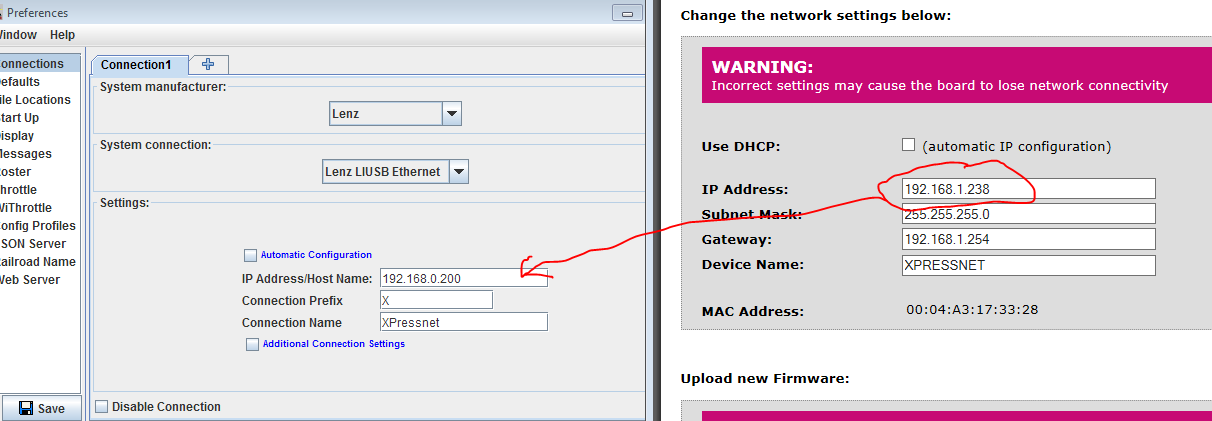
In the LI-USB-Ethernet Configuration interface, the IP address appears in the field
circled in the image below:

- Start one of the JMRI-based programs, Then go to the preferences panel. This opens
automatically the first time a program is run, or you can select it from the "Edit"
menu.
- Select "Lenz LI-USB Ethernet" from the top selection box. There are two configuration
options available for the LI-USB-Ethernet. You may choose to use Manual configuration (the
default) or Automatic configuration:
- To use Manual configuration, enter the IP address you saved
earlier into the box labeled "IP Address", as shown in the image below:
-
Automatic configuration is optional if you set the IP Address of
your LI-USB-Ethernet device to a fixed value. If you use DHCP to configure the
LI-USB-Ethernet's IP address, it is highly recommended that you use Automatic
Configuration.
To use Automatic Configuration, check the Automatic Configuration checkbox. as shown
in the image below:

- Click "Save". You'll be asked if it's OK for the program to quit, click "Yes".
- Restart the program. You should be up and running.
Connecting using a Lenz LZV200
- To connect your computer to Lenz LZV200using the built in USb port, connect the LZV200
to your computer's USB port using a standard USB A to USB B cable.
- Install the appropriate drivers.
For the LZV200 USB connection with JMRI, you must first install a software driver on
your computer. Internally, the device contains a FTDI FT232BM USB to Serial converter.
There are two drivers available for this device, make sure you obtain the Virtual Comm
Port (VCP) driver.
The device drivers for Windows are included on the CD that comes with the device.
The device drivers for Linux are included with recent versions of the Linux kernel.
Device drivers for Linux, and MacOS (8,9 and X ) and Windows are available from the
FTDI website (direct link to the drivers current
as of this writing: https://ftdichip.com/Drivers/VCP.htm).
When the device drivers are installed, and the LZV200 is connected to your PC, the
LZV200 should have a Red LED turned on, indicating the USB connection is OK.
NOTE: If you have installed the Lenz software, make sure none of it is
running. This includes the LI-Server, which may be running in the background.
- Once the drivers are installed, you are ready to configure JMRI. Start one of the
JMRI-based programs, Then go to the preferences panel. This opens automatically the first
time a program is run, or you can select it from the "Edit" menu.
- Select "Lenz LZV200" from the top selection box. You can then select the proper serial
port in the second selection box.
- The Baud rate selection box is fixed to 57,600 baud.
- The fourth box should be set to "no flow control" (the LZV200 does not support flow
control, but check the model numbers).
- Output Interval : 250 ms
- Click "Save". You'll be asked if it's OK for the program to quit, click "Yes".
- Restart the program. You should be up and running.
Connecting to the XpressNet Simulator
Use the XpressNet Simulator connection when you don't have hardware connected. This will let
JMRI still use XPressNet sensors, turnouts and other objects so you can develop your panels
and scripts without access to real devices.
- Start one of the JMRI-based programs, Then go to the preferences panel. This opens
automatically the first time a program is run, or you can select it from the "Edit"
menu.
- Select "XpressNet Simulator" from the top selection box. There are no additional
configuration steps required to use the XpressNet Simulator.
- Click "Save". You'll be asked if it's OK for the program to quit, click "Yes".
- Restart the program. You should be up and running.
Connecting using a ZTC ZTC640
- To connect your computer to one of these XpressNet based DCC systems, you can use a ZTC
ZTC640 interface unit. Connect the ZTC640 to your DCC command station via their XpressNet
connections. Then connect the ZTC640 to your computer's USB port using the supplied
cable.
- In order to use the ZTC640 with JMRI, you must first install a software driver on your
computer. Internally, the device contains a FTDI FT232BM USB to Serial converter. There are
two drivers available for this device, make sure you obtain the Virtual Comm Port (VCP)
driver.
The device drivers for Windows are included on the CD that comes with the device.
The device drivers for Linux are included with recent versions of the Linux kernel
Device drivers for Linux, and MacOS (8,9 and X ) and Windows are available from the
FTDI website. (direct link to the drivers current
as of this writing: https://ftdichip.com/drivers/vcp-drivers/)
When the device drivers are installed, and the ZTC640 is connected to both your PC and
your DCC system, the ZTC640 should have a Red LED turned on, indicating the XpressNet
connection is okay, and a green LED turned on, indicating the USB connection is okay.
- Once the drivers are installed, you are ready to configure JMRI. Start one of the
JMRI-based programs, Then go to the preferences panel. This opens automatically the first
time a program is run, or you can select it from the "Edit" menu.
- Select "ZTC Controls ZTC640" from the top selection box. You can then select the proper
serial port in the second selection box.
- The baud rate selection box should be set to 19,200 baud.
- The fourth box should be left on "no flow control".
- This option has been removed starting in version 2.9.5 Check Buffer
Status When Sending? Defaults to "yes" on Windows and Linux, and "no" on MacOS 8/9 and Mac
OS X. Except when debugging problems, you should leave this at the default.
- Click "Save". You'll be asked if it's okay for the program to quit; click "Yes".
- Restart the program. You should be up and running.
Connecting using the Hornby Elite's built in USB connection
Note: The first JMRI release supporting the Hornby Elite's built-in USB connection is
2.1.2
- To connect your computer to the Hornby Elite using it's built in USB connection,
connect your Hornby Elite's USB port and the computer's USB port using the supplied
cable.
- In order to use the Hornby Elite's built in USB port, you must first install a software
driver on your computer.
The device drivers for Windows are included on the CD that comes with the device and
were previously available from the
http://www.hornby.com/customer-support/downloads/elite-driver-download-and-installation,110,HAR.html
Hornby Website.
It is unknown at this point if there are device drivers available for MacOS or
Linux.
The Hornby Elite has a Green LED that illuminates when it is recognized by the
computer.
- Once the drivers are installed, you are ready to configure JMRI. Start one of the
JMRI-based programs, Then go to the preferences panel. This opens automatically the first
time a program is run, or you can select it from the "Edit" menu.
- Select "Hornby" as Manufacturer, and "Hornby Elite USB port" from the System Connection
drop down.
- You can then select the proper serial port in the second selection box.
- The baud rate selection box should be set to 19,200 baud.
- The fourth box should be left on "no flow control".
- Output Interval : 250 ms
- Click "Save". You'll be asked if it's OK for the program to quit, click "Yes".
- Restart the program. You should be up and running.
Connecting via an XnTcp adapter
Note: The first JMRI release supporting the XnTcp adapter is 2.1.5 More
information on the XnTcp adapter can be found on its home page.
Instructions for configuring JMRI to connect to an XnTcp adapter can be found on the
adapters configuration page.
During configuration, the program tries to find all interfaces available on the LAN by
broadcasting a UDP request. Any adapter(s) present will reply with their NetBios name, which
can then be selected. The preferences store the NetBios name of the interface, rather than
the storing the IP address digits, since the IP address can change due to DHCP
addressing.
Connecting using the XPA and a modem
We have developed an alternative method for connecting to an XpressNet based system which
should prove to be more cost effective on XpressNet based systems that do not support
programming or feedback via the LI100, LI100F, or LI101F computer interfaces, or for those
who are interested in experimenting with computer control, but don't need all the features
supported by the Lenz interfaces.
This system uses the Lenz XpressNet Phone Adapter and a Hayes Compatible modem to provide
control of locomotives and stationary decoders.
- Connect your computer to a Hayes Compatible modem - either a built-in modem card or an
external serial modem.
- Next, Connect the "Phone In" jack on your XPA to the "Wall In" jack on your modem using
the cable supplied with the XPA for connecting a telephone to the XPA.
- Then go to the preferences panel of a JMRI-based program. This opens automatically the
first time a program is run, or you can select it from the "Edit" menu.
- Select "Lenz" from the Manufacturer and "XPA-Modem" as the System Connection. You can
then select the proper serial port in the second selection box.
- The Baud rate selection box defaults to 9,600 baud and can not be changed.
- Output Interval : 250 ms
- Click "Save". You'll be asked if it's OK for the program to quit, click "Yes".
- Restart the program. You should be up and running.

The following tools are available from the XpressNet menu when this connection is active
(click on the name to read more on each tool):
Documentation
JMRI Help
Third Party info
Credits
Thanks to Paul Bender and others for implementing XpressNet
